本文是将演示如何解析pptx文件的形状到WPF当中,并且绘制显示出来
解析Pptx
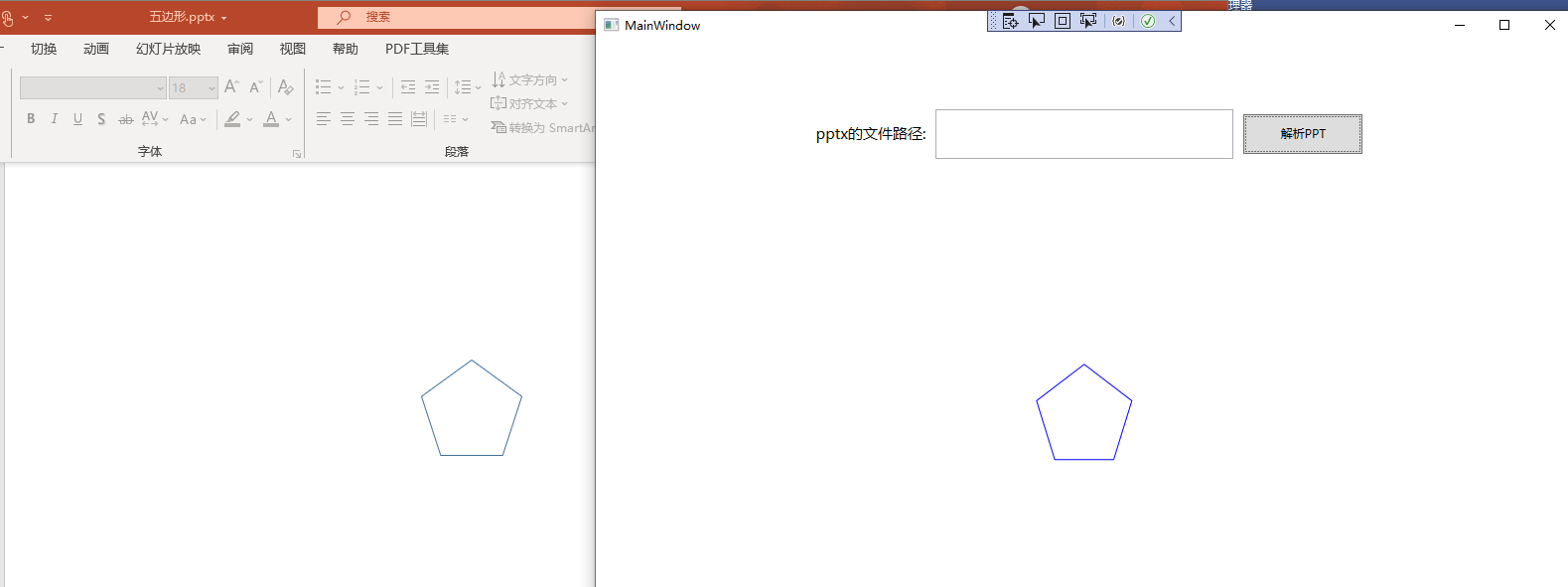
我打算解析pptx中的五边形来作为演示效果,直接上代码:
MainWindow.xaml:
<Grid> <Grid.RowDefinitions> <RowDefinition /> <RowDefinition Height="2*"/> </Grid.RowDefinitions> <StackPanel Orientation="Horizontal" VerticalAlignment="Center" HorizontalAlignment="Center"> <TextBlock Text="pptx的文件路径:" VerticalAlignment="Center" FontSize="15" Margin="10"/> <TextBox x:Name="FilePathText" Height="50" Width="300" Margin="0,0,10,0" TextWrapping="Wrap"/> <Button x:Name="Button" Content="解析PPT" Click="Button_OnClick" Width="120" Height="40"/> </StackPanel> <Path x:Name="Path" Grid.Row="1" HorizontalAlignment="Center" VerticalAlignment="Center" Stroke="Blue"/> </Grid>MainWindow.xaml.cs:
private void PptxToGeometry(string filePath) { if (!File.Exists(filePath) || !filePath.EndsWith(".pptx", StringComparison.OrdinalIgnoreCase)) { return; } using (var presentationDocument = PresentationDocument.Open(filePath, false)) { var presentationPart = presentationDocument.PresentationPart; var presentation = presentationPart?.Presentation; var slideIdList = presentation?.SlideIdList; if (slideIdList == null) { return; } foreach (var slideId in slideIdList.ChildElements.OfType<SlideId>()) { var slidePart = (SlidePart)presentationPart.GetPartById(slideId.RelationshipId); var slide = slidePart.Slide; foreach (var shapeProperties in slide.Descendants<ShapeProperties>()) { var presetGeometry = shapeProperties.GetFirstChild<PresetGeometry>(); if (presetGeometry != null && presetGeometry.Preset.HasValue) { if (presetGeometry.Preset == ShapeTypeValues.Pentagon) { var transform2D = shapeProperties.GetFirstChild<Transform2D>(); var extents = transform2D?.GetFirstChild<Extents>(); if (extents != null) { var width = extents.Cx; var height = extents.Cy; if (width.HasValue && height.HasValue) { var points = GetPentagonPoints(width.Value.EmuToPixel(), height.Value.EmuToPixel()); RenderGeometry(points); } } } } } } } } /// <summary> /// 获取五边形顶点坐标 /// </summary> /// <param name="width"></param> /// <param name="height"></param> /// <returns></returns> /// 该五边形定义出自ECMA-376-Fifth-Edition-Part-1-Fundamentals-And-Markup-Language-Reference /// \OfficeOpenShapeGeometryHelper.cs:
public static class ShapeGeometryHelper { public readonly struct FormulaProperties { public readonly double t; public readonly double h; public readonly double w; public readonly double hd2; public readonly double wd2; public readonly double vc; public readonly double hc; public FormulaProperties(double width, double height) { t = 0; w = width; h = height; hd2 = h / 2; wd2 = w / 2; vc = height / 2; hc = width / 2; } } public static long EmuToPixel(this long eum) { const long defaultDpi = 96; return eum / 914400 * defaultDpi; } /// <summary> /// Open效果如下:
源码
BlogCodeSample/PptPolygonToWPFGeometry at main · ZhengDaoWang/BlogCodeSample
参考
C# dontet Office Open
C# dotnet 使用 Open
C# dotnet 使用 Open
原文转载:http://www.shaoqun.com/a/790366.html
costco:https://www.ikjzd.com/w/1680
派代:https://www.ikjzd.com/w/2197
李群:https://www.ikjzd.com/w/1767
达方物流:https://www.ikjzd.com/w/2562
本文是将演示如何解析pptx文件的形状到WPF当中,并且绘制显示出来首先,我们先安装nuget的opennuget包管理器控制台:Install-PackageDocumentFormat.Opencsproj引用:<PackageReferenceInclude="DocumentFormat.Open解析Pptx我打算解析pptx中的五边形来作为演示效果,直接上代码:MainW
grab:https://www.ikjzd.com/w/841
insider:https://www.ikjzd.com/w/1786
欧麦:https://www.ikjzd.com/w/2085
tineye:https://www.ikjzd.com/w/448
c88:https://www.ikjzd.com/w/1017
我留同事的男友在我家过夜:http://lady.shaoqun.com/m/a/272925.html
口述:我割腕报复劈腿的男人:http://lady.shaoqun.com/m/a/273494.html
口述:相亲被色狼侵犯我痛不欲生:http://www.30bags.com/a/253990.html
把老婆借给别人干 老婆光明正大的当着我的面和别人疯狂激情[完]:http://www.30bags.com/a/255088.html
小说:那嫂子就尝尝你的汤:http://www.30bags.com/a/375269.html
古代千奇百怪避孕妙招,赶紧学起来吧 :http://lady.shaoqun.com/a/350185.html
口服避孕药者怎样留意饮食搭配?要注意这几点 :http://lady.shaoqun.com/a/350186.html
教你使用避孕套远离性病 :http://lady.shaoqun.com/a/350187.html

没有评论:
发表评论